
Components menu
File download
A block containing information about a file with a link to download it.
About this component
The file download component presents a file that the user can download.
The component features:
- the title of the file
- information about the file such as its file format and size
- a download link
- a thumbnail image
You can click on either the thumbnail image or the download link to download the file.
Why we use this component
The file download component provides a consistent way of presenting files for download. It provides useful information about the file such as the size and type of the file. This information can help users to decide whether to download it.
Versions of this component
Generic thumbnail image

Highlighted file
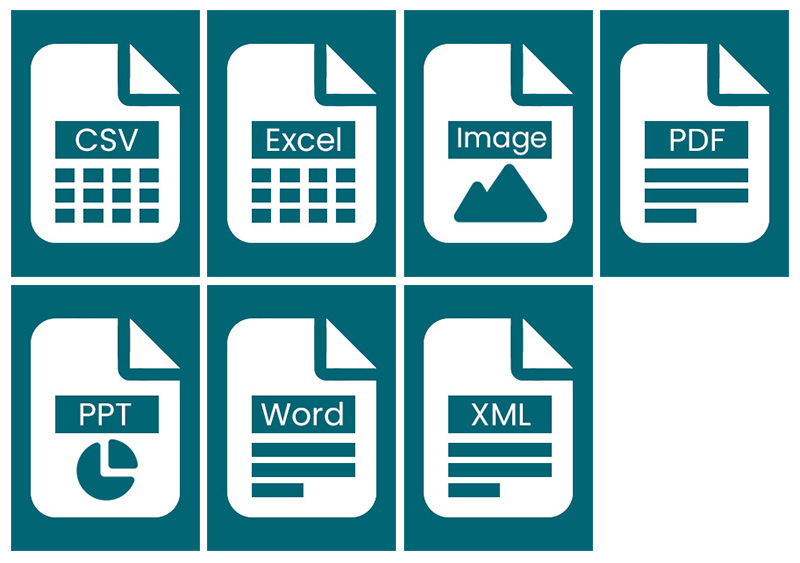
The Design Standard includes a collection of icons for common file types. These icons are in the GitHub repository.
You can highlight a file download block to give it a more prominent appearance. This is useful in cases where there are many file download blocks and you want to give priority to one of them.
You should place any highlighted blocks at the beginning of a group of file download blocks. Highlighted blocks are most effective when they are the only one in a group.
Available file icons
HTML
                                        <div class="file--download">
                                            <div class="file--download-thumbnail">
                                                <a class="file--download-thumbnail-link" aria-hidden="true" tabindex="-1" href="">
                                                    <span class="visually-hidden"> Document cover image </span>
                                                    <img class="file--download-thumbnail-image" src="" alt="" />
                                                </a>
                                            </div>
                                            <div class="file--download-content">
                                                <a class="file--download-title" aria-describedby="file-download" href=""> File Title </a>
                                                <div id="file-download" class="file--download-details">
                                                    <dl class="file--download-metadata">
                                                        <div class="file--download-metadata-item">
                                                            <dt class="file--download-metadata-key visually-hidden"> File type </dt>
                                                            <dd class="file--download-metadata-value"> Number of pages & File type </dd>
                                                            <dd class="file--download-metadata-value">  |  </dd>
                                                        </div>
                                                        <div class="file--download-metadata-item">
                                                            <dt class="file--download-metadata-key visually-hidden"> File size </dt>
                                                            <dd class="file--download-metadata-value"> Size </dd>
                                                        </div>
                                                    </dl>
                                                </div>
                                            </div>
                                        </div>

                                        Highlighted file HTML

                                        <div class="file--download file--download-highlighted">
                                            <div class="file--download-thumbnail">
                                                <a class="file--download-thumbnail-link" aria-hidden="true" tabindex="-1" href="">
                                                    <span class="visually-hidden"> Document cover image </span>
                                                    <img class="file--download-thumbnail-image" src="" alt="" />
                                                </a>
                                            </div>
                                            <div class="file--download-content">
                                                <a class="file--download-title" aria-describedby="file-download" href=""> File Title </a>
                                                <div id="file-download-highlighted" class="file--download-details">
                                                    <dl class="file--download-metadata">
                                                        <div class="file--download-metadata-item">
                                                            <dt class="file--download-metadata-key visually-hidden"> File type </dt>
                                                            <dd class="file--download-metadata-value"> Number of pages & File type </dd>
                                                            <dd class="file--download-metadata-value">  |  </dd>
                                                        </div>
                                                        <div class="file--download-metadata-item">
                                                            <dt class="file--download-metadata-key visually-hidden"> File size </dt>
                                                            <dd class="file--download-metadata-value"> Size </dd>
                                                        </div>
                                                    </dl>
                                                </div>
                                            </div>
                                        </div>
CSS
                                        /* File download
                                        ------------------------------------ */
                                        .file--download {
                                            margin-bottom: 1.5rem;
                                            margin-top: 1.5rem;
                                            padding: 1rem;
                                            background-color: var(--grey-four);
                                            display: flex;
                                        }
                                        .file--download-highlighted {
                                            padding-left: calc(1rem + -4px);
                                            border-left: 8px solid var(--scottish-teal);
                                        }
                                        .file--download-thumbnail {
                                            margin-right: 1rem;
                                        }
                                        .file--download-thumbnail-link {
                                            display: block;
                                            width: 4rem;
                                            border: none;
                                        }
                                        .file--download-thumbnail-link:hover {
                                            background-color: var(--grey-three);
                                            transition-duration: .2s;
                                        }
                                        .file--download-thumbnail-link:focus {
                                            outline: 2px solid var(--verdant-green);
                                            outline-offset: 0;
                                            background-color: var(--verdant-green);
                                            box-shadow: -2px 5px #000, 2px 5px #000;
                                            color: #000;
                                            text-decoration: none;
                                            transition-duration: 0s;
                                        }
                                        .file--download-thumbnail-image {
                                            display: block;
                                            max-width: 100%;
                                            outline-offset: -1px;
                                        }
                                        .file--download__content {
                                            flex-grow: 1;
                                        }
                                        .file--download-title {
                                            display: inline-block;
                                            font-weight: 700;
                                            margin-bottom: .5rem;
                                        }
                                        .file--download .file--download-metadata {
                                            line-height: 1.5rem;
                                        }
                                        .file--download-metadata-item {
                                            display: inline;
                                            position: relative;
                                        }
                                        .file--download-metadata-key {
                                            clip: rect(1px, 1px, 1px, 1px);
                                            height: 1px;
                                            overflow: hidden;
                                            position: absolute !important;
                                            width: 1px;
                                            display: inline;
                                            font-weight: normal;
                                        }
                                        .file--download-metadata-value {
                                            display: inline;
                                            font-weight: 400;
                                            margin-left: 0;
                                        }